
Beyond Better Image Quality: What the Next Generation of Anime AI Models Needs to Solve
You can spend several minutes describing an OC, specifying the outfit, positioning two characters, explaining what they’re doing, and setting the mood of the scene, only to find that the finished image has ignored half of it.
Next-generation anime AI models are being designed not just for consistency but to capture your exact idea. Newer models like PixAI’s Tsubaki.3 offer better prompt adherence, more reliable character identity, stronger handling of complicated scenes, and enough flexibility to keep experimenting without
In this guide, we’ll look at the problems the next generation anime AI models need to solve and what creators should actually pay attention to when evaluating them.
Does the model actually follow your prompt?
One of the easiest ways to tell whether an AI model is useful is to give it something more complicated than a basic character description. Instead of asking for an anime girl standing in a field, describe her outfit, pose, expression, surroundings, and what she is doing. Then see how much of that actually makes it into the image.
Anime AI generation can produce an attractive result while still missing the details that matter most to you. Maybe the character has the right hairstyle but the wrong outfit, or the scene has the right mood but completely ignores the requested composition.
Traditional anime AI workflows have often required users to learn how the model prefers to interpret prompts. Tags, weights, tag order, and other prompting techniques became part of the process because explaining an idea in ordinary language didn’t always produce reliable results.
Those techniques still have their place, especially for experienced users who want precise control. However, better instruction understanding can make the process feel more natural. Instead of concentrating so heavily on the syntax a particular model expects, creators can spend more time explaining the scene they actually want.
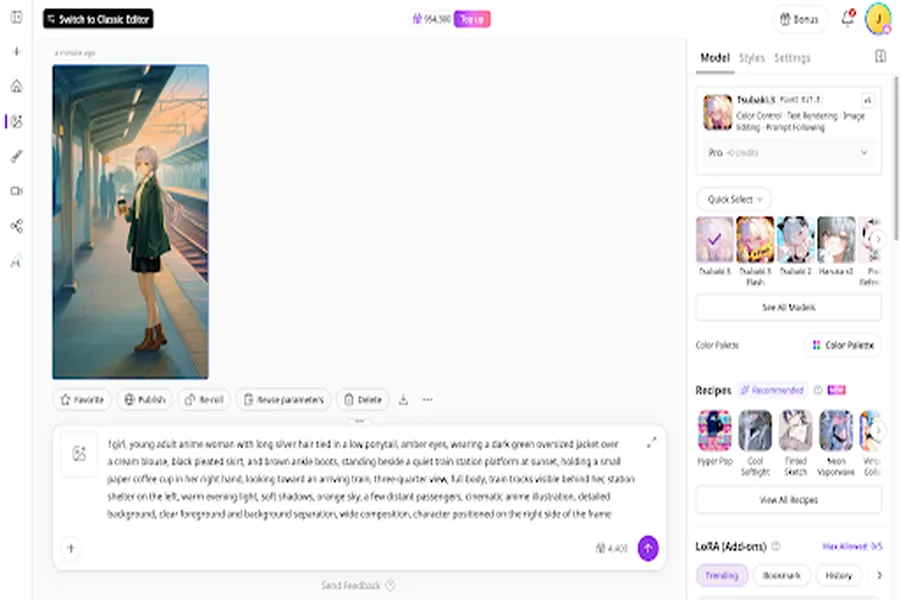
Can it keep your character recognizable?
Anime AI character consistency is another area where the difference between a fun AI generator and a genuinely useful creative tool becomes obvious.
Generating one attractive portrait of an OC is relatively easy. The harder test comes when you start changing things. Give the character a different outfit, put them in another location, change their pose, or place them next to another character and see whether the important identity details survive.
Small changes can have a surprisingly large effect. Hair may become a different shape, facial features can drift, clothing details can disappear, and proportions may change enough to make the character feel like somebody else entirely.
For example, we can use Tsubaki.3 to put our character from the first in a completely different setting.
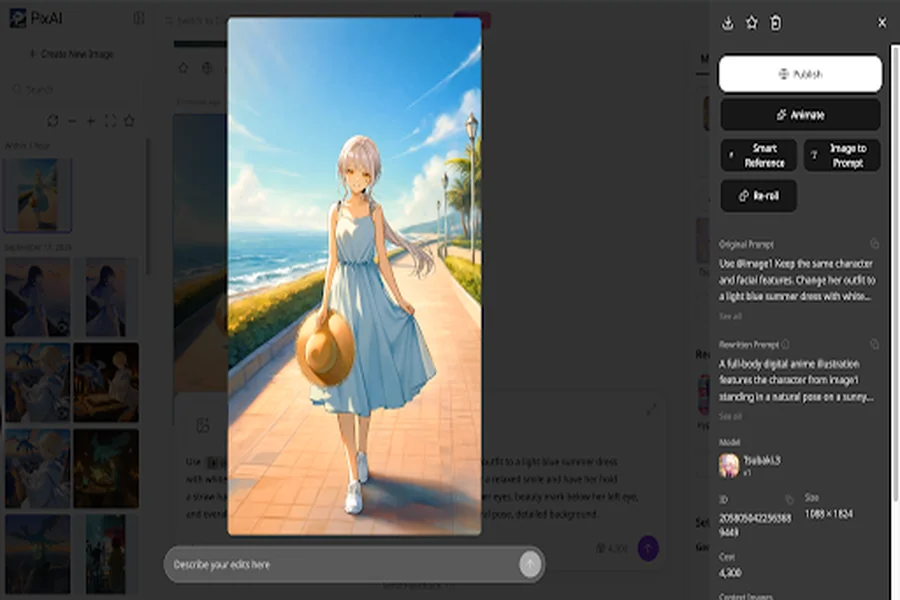
That matters if you’re creating a character for something ongoing. A webcomic, visual novel, VTuber project, or social media series can require dozens or even hundreds of images featuring the same character. Redesigning or correcting the character each time quickly becomes more work than the original generation was worth.
That is why you should test character consistency across several generations rather than judge it from a single showcase image. You don’t necessarily need every image to be identical, but the character should retain the features that make them recognizable.
Can it handle complicated scenes?
Single-character portraits give an AI model plenty of room to work. Once you start working with multi-character AI art, specific interactions, objects, and spatial relationships, things get much harder.
Imagine asking for two characters sitting at a café table, with one character holding a drink while the other leans forward to talk to them. Now add a specific camera angle, a busy background, different outfits, and a particular time of day. The model has to track many more details, and they all need to fit together.
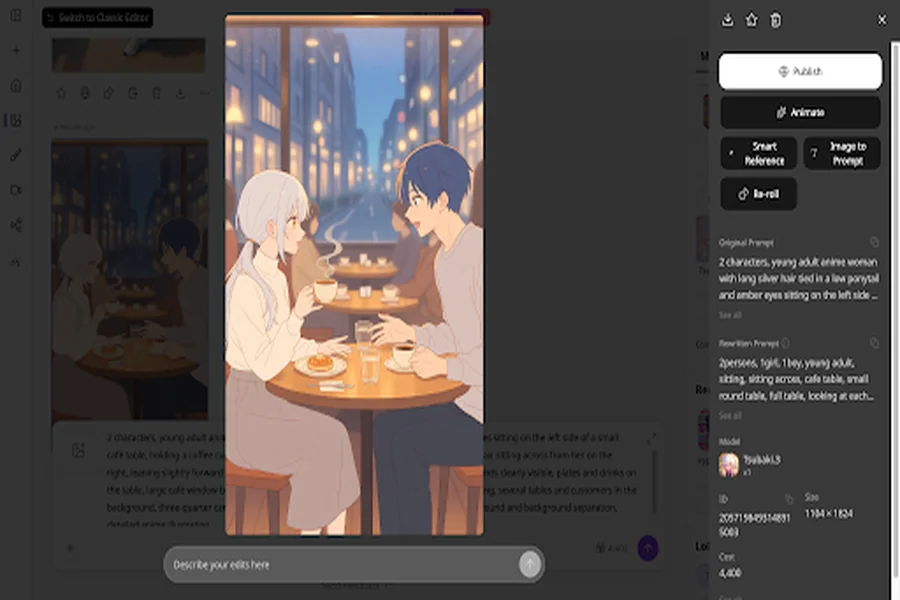
This is where complex AI image composition matters. The goal isn’t simply to create more objects in the same image. The model needs to understand how those elements relate to one another. A character meant to stand behind another shouldn’t suddenly appear in front, and two characters shouldn’t lose their individual identities just because they’re sharing a scene.
For creators, this is a much more useful test than generating another attractive portrait. If you regularly create story scenes, try giving a new model an actual scene from your project and see how well it understands the relationships between the different elements.
Can you experiment with different styles?
Style flexibility is another quality that’s becoming more useful as creators become more comfortable with AI art.
You might have one project that needs a soft, atmospheric anime look and another that calls for something cleaner and more manga-inspired. Even within the same project, you may want to experiment with lighting, color treatment, composition, or a completely different visual direction.
A model that only works reliably with one narrow visual approach can make that experimentation frustrating. Every change may require a different model, a different prompting strategy, or a lot of trial and error before you get back to a usable result.
Broader style generalization can make that process easier by allowing creators to explore different visual directions without abandoning the underlying idea. It doesn’t mean a model will perfectly reproduce every possible style, and it doesn’t remove the need for references or iteration.
The more practical question is how much freedom the model gives you. If you can change the visual direction while still maintaining the character, scene, and overall intent, you have considerably more room to create.
What happens after the first generation?
One more thing to consider when evaluating a model is what happens after you’ve generated the image.
Most useful AI artwork goes through several rounds of changes. You might fix a face, alter an outfit, adjust the composition, create another variation, use a reference image, or eventually turn the artwork into an animation. The first generation is often just the starting point.
That makes workflow compatibility increasingly important. A model can produce an excellent image and still be frustrating if every correction means starting again from zero. On the other hand, a strong starting image becomes much more valuable when it can move naturally into reference-based creation, editing, refinement, and other stages of the creative process.
This matters especially for creators working on recurring content. The more often you have to repeat a task, the more noticeable small amounts of friction become. Saving a few minutes on every iteration can make a substantial difference over the course of a project.
Where Tsubaki.3 fits
Tsubaki.3 is an interesting example of this broader shift in anime AI. The model has just launched on PixAI, and it has been developed around areas such as instruction understanding, character intent, complex compositions, and broader style handling.
Those priorities are worth watching because they address problems that become much more obvious once you move beyond one-off image generation. The goal here is to make the model more useful when the creator has a specific idea that needs to survive through a more involved workflow.
A model’s launch is only the beginning of that evaluation. The most useful approach is to give Tsubaki.3 the same challenges you would give any new model. Test a detailed character description, change the outfit, introduce a second character, move the scene somewhere else, and experiment with a different visual direction. Pay attention not only to the first image, but also to how much work it takes to get the result you want.
The real test is your workflow
The best way to judge a new anime AI model is to stop treating it like an image-quality contest.
A polished showcase image can tell you that a model is capable of producing attractive artwork, but it won’t tell you how useful that model will be after you’ve generated your tenth image. You need to know whether it can understand detailed instructions, keep your characters recognizable, manage more complicated compositions, and give you enough flexibility to keep refining the work.
New and more capable models like Tsubaki.3 are worth a bit more testing, but don’t jump to conclusions. The goal is not merely produce another impressive illustration, but support the creator’s real workflow.
So when you’re testing the next model that catches your attention, give it something harder than a simple portrait. Take one of your actual creative ideas and see how well the model handles it from start to finish.
If it saves you time on the parts that normally make AI art frustrating, that’s a far more meaningful improvement than a slightly prettier first generation.