
How to Prepare Security Systems for Power, Network, and Severe Weather Disruptions
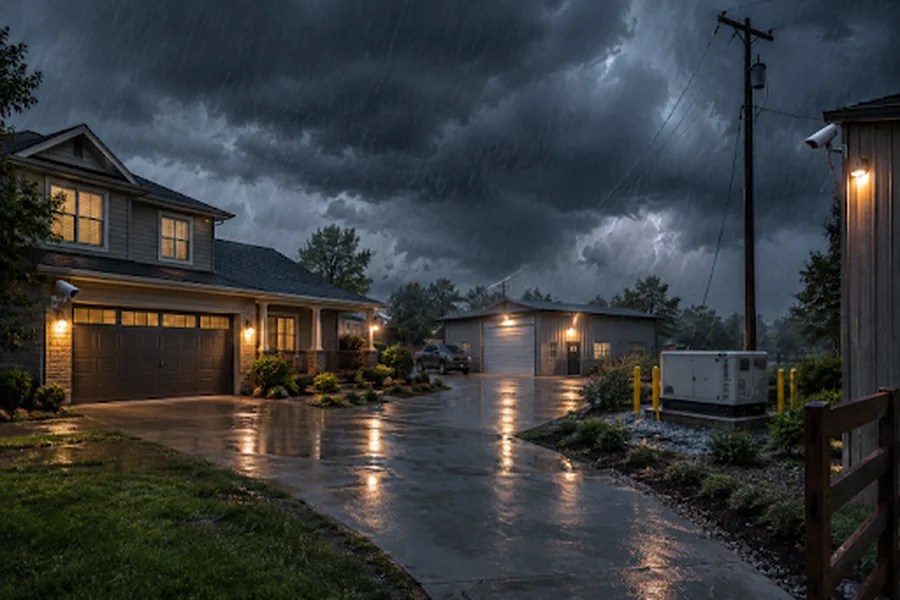
Security equipment is most valuable when normal services are unavailable. A dependable plan for power failures, internet interruptions, and severe weather helps homeowners and business operators keep alarms, cameras, and essential alerts functioning when conditions become difficult. Reliable preparation starts with understanding how the system works and where complete monitoring solutions fit into the larger safety plan.
A security system is not a single device. It may include a control panel, sensors, cameras, a router, a recorder, backup batteries, and mobile notifications. If one component loses power or connectivity, some features may continue while others stop. Reviewing those dependencies before storm season can prevent unwelcome surprises during an outage.
Why Disruptions Deserve More Attention
Storms, flooding, high winds, extreme heat, and winter weather can affect electricity, roads, broadband connections, and cellular service at the same time. Planning should account for the possibility that a person cannot reach the property immediately or make a normal phone call. The National Weather Service advises households and workplaces to have multiple ways to receive warnings and to establish communication plans before severe weather arrives.
Preparation is not limited to weather alerts. It should also cover the security system’s ability to remain powered, report trouble conditions, and notify the right people. A system that sounds locally but cannot transmit an alarm or send a notification may not meet the needs of an empty home, remote property, or business after hours.
Start With a Full System Check
Begin with a written inspection of every major component. A panel can appear normal even when a peripheral device has a weak battery, poor signal, damaged wire, or unreliable connection. Record what was tested, the date, and any warning messages so small issues do not disappear into memory.
- Check the control panel for trouble, tamper, low-battery, or communication messages.
- Review the age and condition of replaceable batteries according to the equipment instructions.
- Test door, window, motion, smoke, and water sensors using the approved procedure.
- Confirm that cameras record correctly and that authorized users can view them when expected.
- Verify that the system can send a test signal or communication-status notice through its normal path.
Test Backup Power Before the Storm
Backup power can keep important equipment operating, but it has limits. The alarm panel may have its own battery, while the internet modem, router, network switch, camera recorder, and display each rely on a separate outlet. If those devices are not protected, local alarm functions may remain active while remote video access and app notifications become unavailable.
- Check battery installation dates and replace batteries when the manufacturer recommends it.
- Perform a brief, controlled power test only when the equipment instructions permit it.
- Use appropriately sized uninterruptible power supplies for critical networking or recording equipment.
- Keep backup equipment dry, accessible, and away from areas likely to flood.
- Use surge protection where appropriate, recognizing that it does not replace backup power.
If a generator is part of the plan, safety comes first. Generators should be operated outdoors and away from doors, windows, and vents because they produce carbon monoxide. The guidance for safe generator use during power outages also stresses avoiding unsafe connections to a building’s electrical system. Consult a qualified electrician for permanently installed equipment or transfer-switch questions.
Review Every Communication Path
Know how alarms and status messages leave the property. Systems may use broadband, cellular service, a landline, or more than one method. Ask what remains available if the internet fails, whether the panel identifies a communication failure, and whether a secondary path exists.
Questions to Ask
- What functions continue if the internet connection goes offline?
- Will the system report a loss of communication?
- Does the system have a secondary path for alarm reporting?
- How long can essential devices operate on battery power?
- When was the communication path last tested?
Older equipment deserves special attention. Communication technologies and service offerings can change, so confirm that installed hardware is still supported and that its connection method remains appropriate for the property’s needs.
Keep Contact Information Current
An alarm or trouble alert is only useful if it reaches someone who can act. Review every phone number, email address, user permission, and notification order. Remove former employees, tenants, contractors, or family members who no longer need access, and use clear labels such as “primary keyholder” or “after-hours manager.”
A review every three to six months is a practical routine, especially after a move, staffing change, renovation, or change in operating hours. Keep emergency contact details and equipment information in a secure location that authorized people can access if the usual app or computer is unavailable.
Create a Severe Weather Response Plan
A concise plan gives people direction when alerts begin arriving quickly. List the systems that must stay online, identify who will review notifications, choose a backup method for reaching key contacts, and state when a technician, utility provider, or emergency service should be called. Include safe sheltering and evacuation decisions separately from property-protection tasks.
For example, a small retail store may protect its alarm panel with a battery but overlook the router and camera recorder. During an outage, the alarm may still operate locally, while remote video viewing and mobile notifications stop. A complete plan identifies that gap before it matters.
Use Alerts Without Creating Alarm Fatigue
Not every alert requires the same response. Label notifications clearly, distinguish urgent events from routine maintenance messages, and explain to each recipient what actions are expected. Repeated low-battery, power-loss, or communication alerts should be investigated rather than muted. Keeping a short record of recurring problems can reveal a failing device or unreliable connection.
Practice a Short Outage Drill
Conduct a brief drill once or twice a year, and before the period when severe weather is most likely in your area. Notify everyone involved, follow the equipment instructions, verify that expected alerts arrive, then restore normal power and check for warnings. Include camera access, backup contacts, and staff communication for larger properties. The National Weather Service recommends practicing severe-weather plans so people know where to go and how to communicate when a warning is issued.
Common Mistakes to Avoid
- Waiting until a storm warning to inspect equipment.
- Assuming a normal-looking control panel means every connected device is working.
- Ignoring recurring battery or communication warnings.
- Relying on one power source or one communication method.
- Leaving outdated contacts and access permissions in place.
- Operating a generator indoors, in a garage, or too close to openings.
- Failing to document repairs, upgrades, and test results.
Conclusion
Security readiness depends on more than installing sensors and enabling notifications. It requires tested backup power, dependable communication paths, accurate contact information, and a clear response plan. Regular checks and short drills help expose problems while there is still time to correct them, making it easier to stay informed when power and communication services are disrupted.